


Prepare the Privacy Policy For Apps
The change to the App Store Review Guidelines specifies that developers must include the Privacy Policy link in the App […]
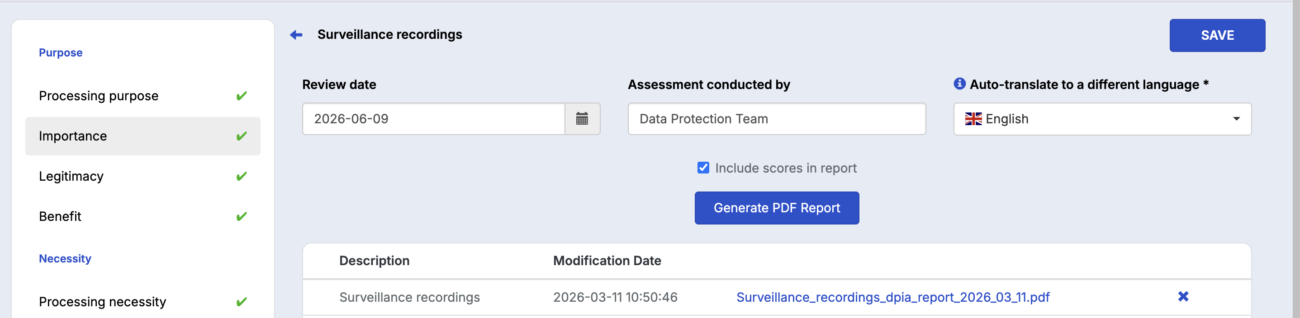
Organisations under GDPR pressure are expected to show more than good intentions. They need to identify privacy risks early, document decision-making clearly, and demonstrate that safeguards were considered before high-risk processing goes live. That is where DPIA software becomes valuable.
A Data Protection Impact Assessment (DPIA) is required under GDPR when processing is likely to result in a high risk to individuals’ rights and freedoms. It is meant to happen before processing starts, as part of planning and design, not after launch. GDPR Article 35 also sets out core elements of a DPIA, including a description of the processing, an assessment of necessity and proportionality, risk analysis, and measures to address those risks.
For many teams, however, the reality is messy. DPIAs are often created in Word files, tracked in spreadsheets, reviewed over email, and stored across folders with little consistency. That makes it harder to involve the right stakeholders, harder to maintain a clear audit trail, and harder to revisit decisions later.
DPIA software solves that problem by turning privacy assessments into a structured workflow.
DPIA software is a platform that helps organisations create, manage, review, and store Data Protection Impact Assessments in a repeatable and audit-ready way.
Instead of relying on static templates, teams work through guided steps that help them describe the processing activity, identify risks, assess proportionality, document mitigations, collect approvals, and maintain a record of the final decision. The aim is not just to complete a form. It is to support a defensible decision-making process.
Good DPIA software should help teams:
This matters because supervisory guidance consistently emphasises that DPIAs should be systematic, risk-based, and started early in the lifecycle of a project.
Under GDPR, a DPIA is required where processing is likely to result in a high risk to the rights and freedoms of natural persons. Article 35 specifically points to examples such as systematic and extensive evaluation based on automated processing, large-scale processing of special category data, and systematic monitoring of publicly accessible areas on a large scale.
In practice, a DPIA is commonly needed when your organisation is:
It is also widely treated as good practice for major projects involving personal data, even where the threshold is not entirely obvious.
AUDIT-READY ASSESSMENTS
An audit-ready DPIA goes beyond a few notes in a spreadsheet. It creates a clear record of what the organisation considered, why it reached its conclusion, and what measures were put in place.
Clearly explain what data processing is planned, why it is being carried out, and what the organisation is trying to achieve.
Show why the processing is needed and whether the chosen approach is proportionate to the intended purpose.
Identify the potential privacy risks for individuals and evaluate how serious and likely those risks are.
Document the safeguards, controls, and mitigation measures the organisation will put in place.
Explain the wider purpose, stakeholders, and operational background of the initiative.
Set out what types of personal data are involved and whose data is being processed.
Clarify who is involved in the assessment, who reviews it, and who is responsible for follow-up actions.
Capture the operational, organisational, and technical protections supporting the assessment.
Keep a record of internal feedback, legal review, privacy input, and reasoning during the process.
Show who approved the assessment, when it was approved, and how accountability was documented.
Track changes as the project evolves and keep a clear record of how the assessment was maintained.
Why this matters: A DPIA should not be treated as a one-time document. It should be reviewed whenever necessary, especially when the nature, scope, context, or risks of the processing change.
Many organisations start with manual templates because they are familiar and inexpensive. That can work for one or two assessments. It becomes much harder when volumes grow, more teams are involved, or you need consistent quality across the organisation.
With spreadsheets and manual workflows, common issues include:
DPIA software gives teams a more structured process. Instead of asking every stakeholder to reinvent the assessment from scratch, it provides a shared workflow for documenting facts, evaluating risks, applying safeguards, and recording approvals.
That is especially useful for organisations that need to show not just that an assessment exists, but that the assessment was completed in a thoughtful, repeatable, and accountable way.
A DPIA is rarely owned by one person alone.
Privacy and compliance teams usually drive the process, define review standards, and maintain accountability records. Legal teams check the reasoning, legal basis, and defensibility of conclusions. Product and operational teams provide the practical context: what the feature does, what data it uses, how users are affected, and what controls are technically feasible.
Without a shared platform, this collaboration often breaks down into fragmented reviews. Product teams send partial answers. Legal teams review late. Privacy teams chase information manually. Final records sit in disconnected folders.
DPIA software helps solve that by giving every stakeholder a role inside the same process. That leads to better inputs, earlier escalation of risk, and stronger final documentation.
Many organisations dealing with DPIAs also need a structured way to handle Legitimate Interest Assessments (LIAs).
An LIA is used when an organisation relies on legitimate interests as its lawful basis for processing personal data. The core analysis is often described as a three-part test: identify the legitimate interest, assess whether the processing is necessary, and balance that interest against the rights and freedoms of the individual. ICO guidance describes an LIA as a contextual risk assessment and recommends documenting it to demonstrate accountability.
This is why many teams now look for DPIA and LIA software together, rather than separate documents and workflows for each assessment type. The underlying needs are similar: structured reasoning, consistent records, stakeholder collaboration, and evidence that the organisation thought carefully about privacy risk.
Not all DPIA tools are equal. Some are little more than digital forms. Others help teams build a more complete privacy governance process.
When comparing DPIA software, look for features such as:
What to look for in DPIA software
Not all DPIA tools are equal. A strong platform should help your team move faster, stay consistent, and document decisions clearly across every assessment.
Templates are static. Privacy risk is not.
As organisations adopt more tools, launch more features, use more vendors, and rely more on data-driven decisions, privacy assessments become more frequent and more operational. At that point, the challenge is no longer just knowing what a DPIA is. The challenge is making sure the process is practical, consistent, and fast enough to support the business without sacrificing accountability.
That is why teams increasingly move from Word files and Excel trackers to dedicated DPIA software. They need a system that helps them assess risk early, document decisions clearly, and stay ready for audits, customer due diligence, and regulator questions.
GDPR Register helps teams turn privacy assessments into a structured, repeatable workflow.
Instead of managing DPIAs and LIAs through scattered templates and manual review cycles, teams can work in one place to identify risks, document reasoning, apply safeguards, collect approvals, and generate audit-ready records. This helps legal, privacy, compliance, and product teams collaborate more effectively while keeping assessments easier to review, update, and demonstrate over time.
For organisations that want to reduce compliance admin while improving consistency, dedicated DPIA software is not just a documentation tool. It is part of building a more mature privacy operation.
The change to the App Store Review Guidelines specifies that developers must include the Privacy Policy link in the App […]

Google is revamping Google Analytics for a world in which privacy plays center stage and identifiers are exiting stage left. […]